 Copyccino
01 / RAILWAY
All aboard.
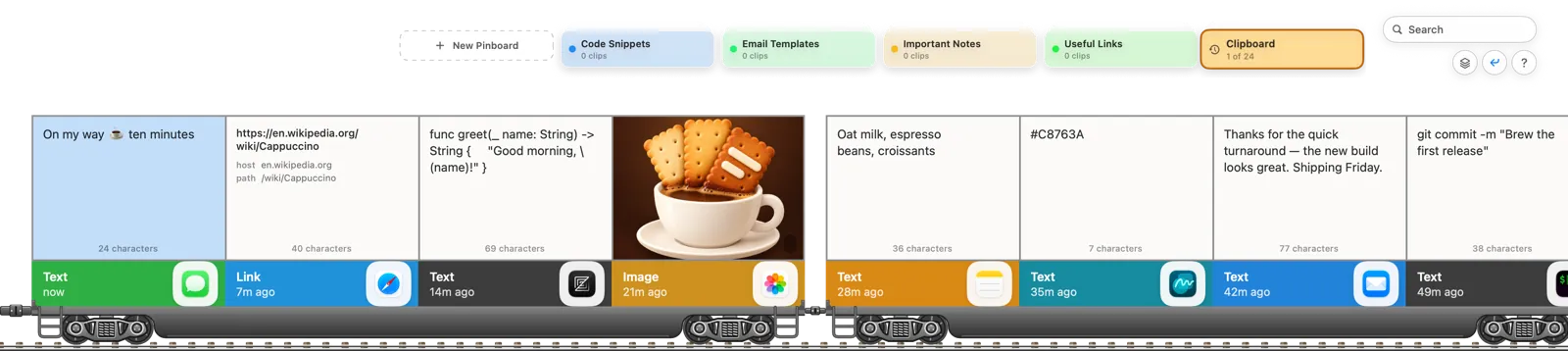
Your clips ride a freight train, four to a cart. Click a locomotive and it flashes its lamp, sounds its horn and sets off down the line; press Space to bring it to a stop.

Clipboard history for your Mac
Copyccino keeps everything you copy, text, links, pictures and files, and serves it back as cards you can browse, search and paste with a keystroke.
Coming soon · macOS 13 or later · ⇧⌘V to pour
FIVE WAYS TO POUR
Every copy becomes a card in its source app's color. Pick the layout that suits the moment; they all search, select and paste the same way.
Your clips ride a freight train, four to a cart. Click a locomotive and it flashes its lamp, sounds its horn and sets off down the line; press Space to bring it to a stop.
Clips hang from a rope by wooden pegs, under your menu bar. Tug the rope, send a breeze along it, hang paper lanterns and cranes between your clips, and keep an eye on the birds that come to perch.

A calm grid of equal cards, column by column, for when you want to scan a lot at once. Arrow keys move to the card beside, above or below.

A conveyor belt above your Dock, with a station at each end. Press Run, and again to go faster, up to fifteen clips a second; hit the big red Stop, or Space, and it brakes to a halt.

Clips leave a stack at the top, come down to you, one at a time, and go back up to rejoin it. Turn it with the arrow keys or a flick of two fingers.

ON THE MENU
Type to filter as you go. Copyccino even finds the words inside screenshots and pictures, read on your Mac.
Keep the snippets, replies and links you reuse on boards you name. Each board keeps its own copies to edit.
Queue up several clips and paste them in order, one shortcut press at a time.
Arrows to choose, Return to paste, ⌘1–⌘9 for the next nine, ⌥ for plain text. Typing goes straight to search.
Drag a card into any app. Files and pictures arrive as files, text as text.
Follow your Mac's appearance or pick one. Cards take their app's color in both.
Keep your history and pinboards in step across your Macs. It is off until you turn it on.
English, Chinese (Simplified and Traditional), Japanese, Korean, Spanish, French and Russian.
PRIVATE BY DESIGN
Made by the same independent developer.

A native Markdown editor. A quiet place to read, write and think.
twainty.starvale.io
Pin screenshots, files and notes beside your work. Now on the App Store for Mac, iPhone and iPad.
pensile.app
Deep clean for macOS. Clear what apps leave behind and see what fills your disk.
gobystation.com
54 everyday developer tools in one native Mac app, entirely offline.
digitcube.starvale.io